Detecting Activity failures
Temporal detects different kinds of Activity Execution failures — for both Workflow Activities and Standalone Activities — through the following timeouts:
Schedule-To-Start Timeout
What is a Schedule-To-Start Timeout in Temporal?
A Schedule-To-Start Timeout is the maximum amount of time that is allowed from when an Activity Task is scheduled (that is, placed in a Task Queue) to when a Worker starts (that is, picks up from the Task Queue) that Activity Task. In other words, it's a limit for how long an Activity Task can be enqueued.
 Set a Schedule-To-Start Timeout using the .NET SDKfeature-guide
 Set a Schedule-To-Start Timeout using the Go SDKfeature-guide
 Set a Schedule-To-Start Timeout using the Java SDKfeature-guide
 Set a Schedule-To-Start Timeout using the PHP SDKfeature-guide
 Set a Schedule-To-Start Timeout using the Python SDKfeature-guide
 Set a Schedule-To-Start Timeout using the Ruby SDKfeature-guide
 Set a Schedule-To-Start Timeout using the Rust SDKfeature-guide
The moment that the Task is picked by the Worker, from the Task Queue, is considered to be the start of the Activity Task Execution for the purposes of the Schedule-To-Start Timeout and associated metrics. This definition of "Start" avoids issues that a clock difference between the Temporal Service and a Worker might create.
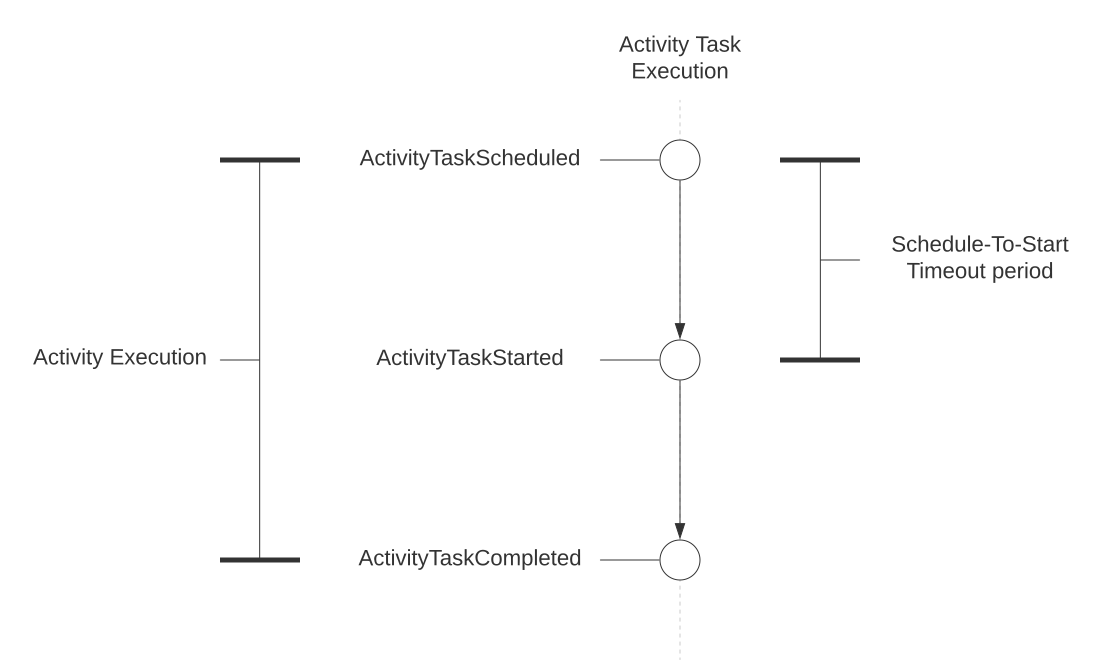
Schedule-To-Start Timeout period
"Schedule" in Schedule-To-Start and Schedule-To-Close have different frequency guarantees.
The Schedule-To-Start Timeout is enforced for each Activity Task, whereas the Schedule-To-Close Timeout is enforced once per Activity Execution. Thus, "Schedule" in Schedule-To-Start refers to the scheduling moment of every Activity Task in the sequence of Activity Tasks that make up the Activity Execution, while "Schedule" in Schedule-To-Close refers to the first Activity Task in that sequence.
An Activity Execution can be composed of multiple Activity Task Executions, with each Task representing a single attempt or retry. Each time you start an Activity — as a step in a Workflow or as a Standalone Activity — that call represents a single logical Activity Execution.
If that Activity fails (for example, due to a timeout or error) and a Retry Policy is in place, Temporal will schedule another attempt to execute the same Activity. Each attempt is called an Activity Task Execution.
A Retry Policy attached to an Activity Execution retries an Activity Task.
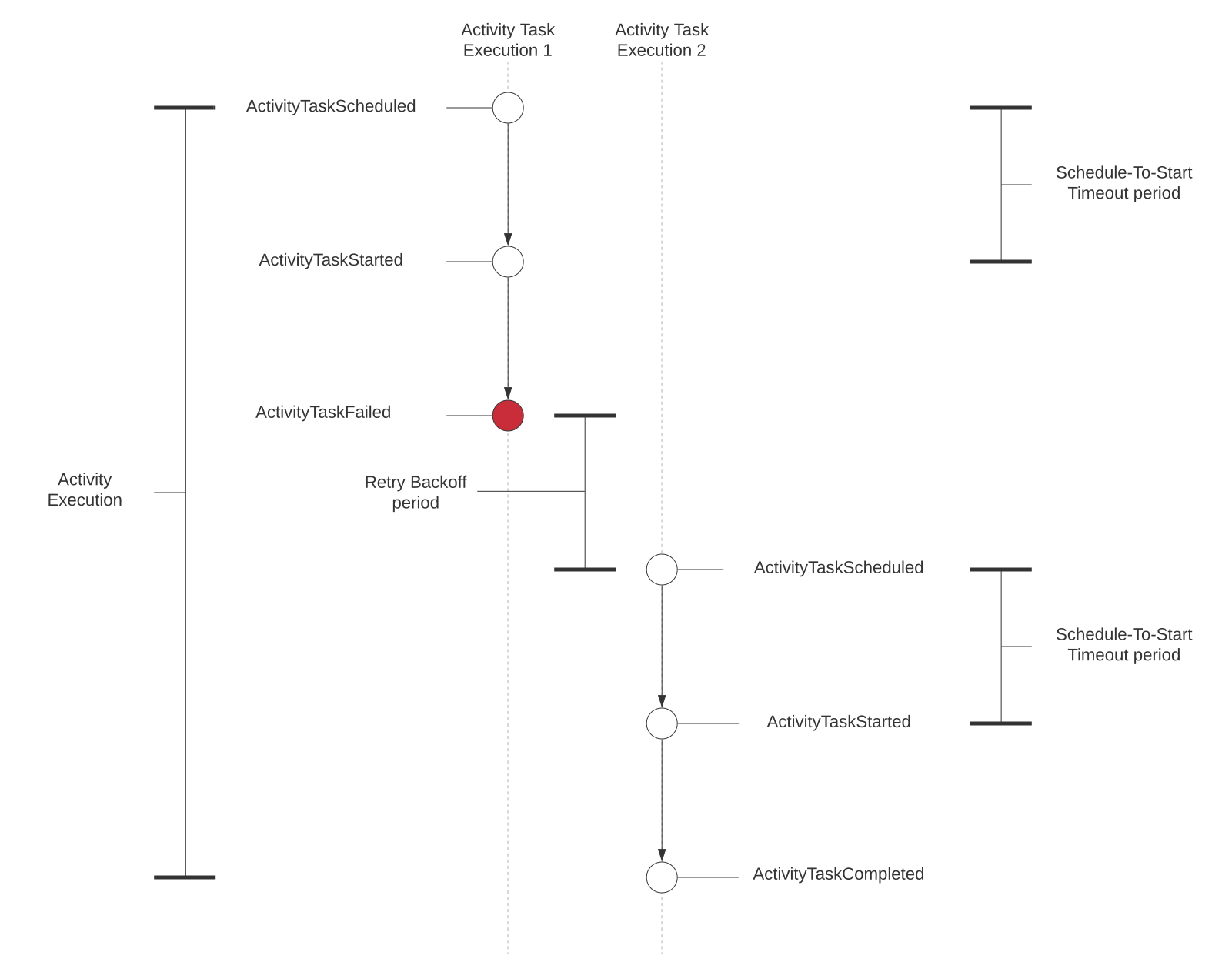
Start-To-Close Timeout period with retries
This timeout has two primary use cases:
- Detect whether an individual Worker has crashed.
- Detect whether the fleet of Workers polling the Task Queue is not able to keep up with the rate of Activity Tasks.
The default Schedule-To-Start Timeout is ∞ (infinity).
If this timeout is used, we recommend setting this timeout to the maximum time a Workflow Execution is willing to wait for an Activity Execution in the presence of all possible Worker outages, and have a concrete plan in place to reroute Activity Tasks to a different Task Queue. This timeout is non-retryable by design. It does not trigger any retries regardless of the Retry Policy, as a retry would place the Activity Task back into the same Task Queue.
In most cases, we recommend monitoring the temporal_activity_schedule_to_start_latency metric to know when Workers slow down picking up Activity Tasks, instead of setting this timeout.
Start-To-Close Timeout
What is a Start-To-Close Timeout in Temporal?
A Start-To-Close Timeout is the maximum time allowed for a single Activity Task Execution.
- Set a Start-To-Close Timeout using the .NET SDKfeature-guide
- Set a Start-To-Close Timeout using the Go SDKfeature-guide
- Set a Start-To-Close Timeout using the Java SDKfeature-guide
- Set a Start-To-Close Timeout using the PHP SDKfeature-guide
- Set a Start-To-Close Timeout using the Python SDKfeature-guide
- Set a Start-To-Close Timeout using the Ruby SDKfeature-guide
- Set a Start-To-Close Timeout using the Rust SDKfeature-guide
The Start-To-Close Timeout has no default value of its own. If you set only the Schedule-To-Close Timeout, the Temporal Service uses that value as the Start-To-Close Timeout. If you set neither timeout, the Temporal Service rejects the Activity. For a Workflow Activity, the Workflow Task fails with a Bad Schedule Activity Attributes error.
We recommend always setting this timeout; however, make sure that Start-To-Close Timeout is always set to be longer than the maximum possible time for the Activity Execution to complete. For long running Activity Executions, we recommend also using Activity Heartbeats and Heartbeat Timeouts.
We strongly recommend setting a Start-To-Close Timeout.
The Temporal Server doesn't detect failures when a Worker loses communication with the Server or crashes. Therefore, the Temporal Server relies on the Start-To-Close Timeout to force Activity retries.
The main use case for the Start-To-Close timeout is to detect when a Worker crashes after it has started executing an Activity Task.
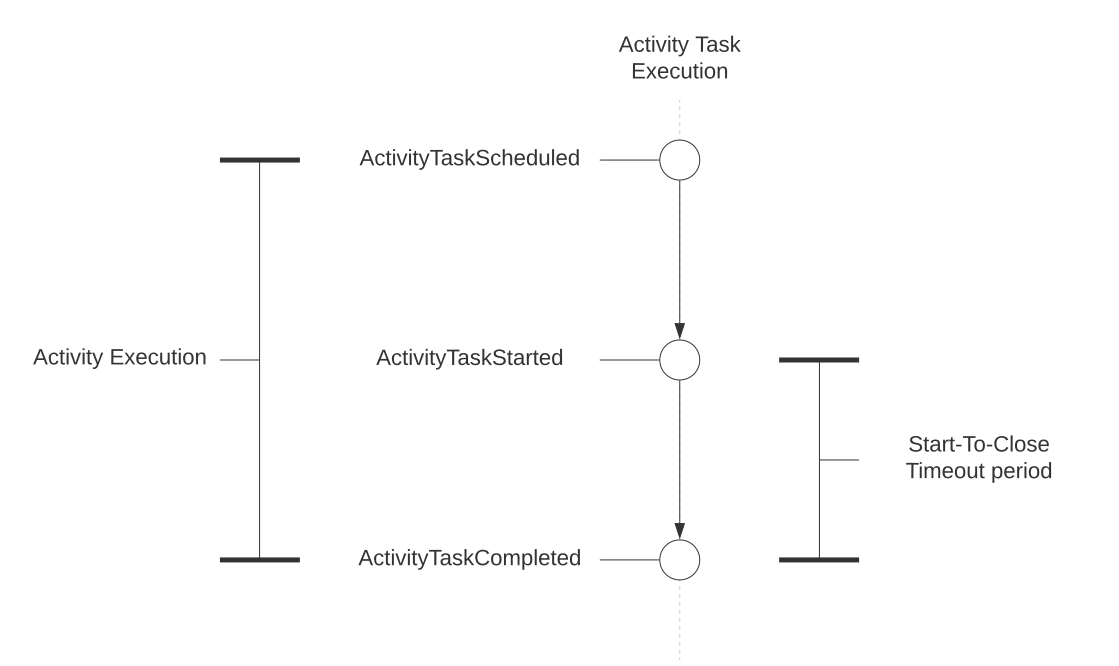
Start-To-Close Timeout period
A Retry Policy attached to an Activity Execution retries an Activity Task Execution. Thus, the Start-To-Close Timeout is applied to each Activity Task Execution within an Activity Execution.
If the first Activity Task Execution returns an error the first time, then the full Activity Execution might look like this:
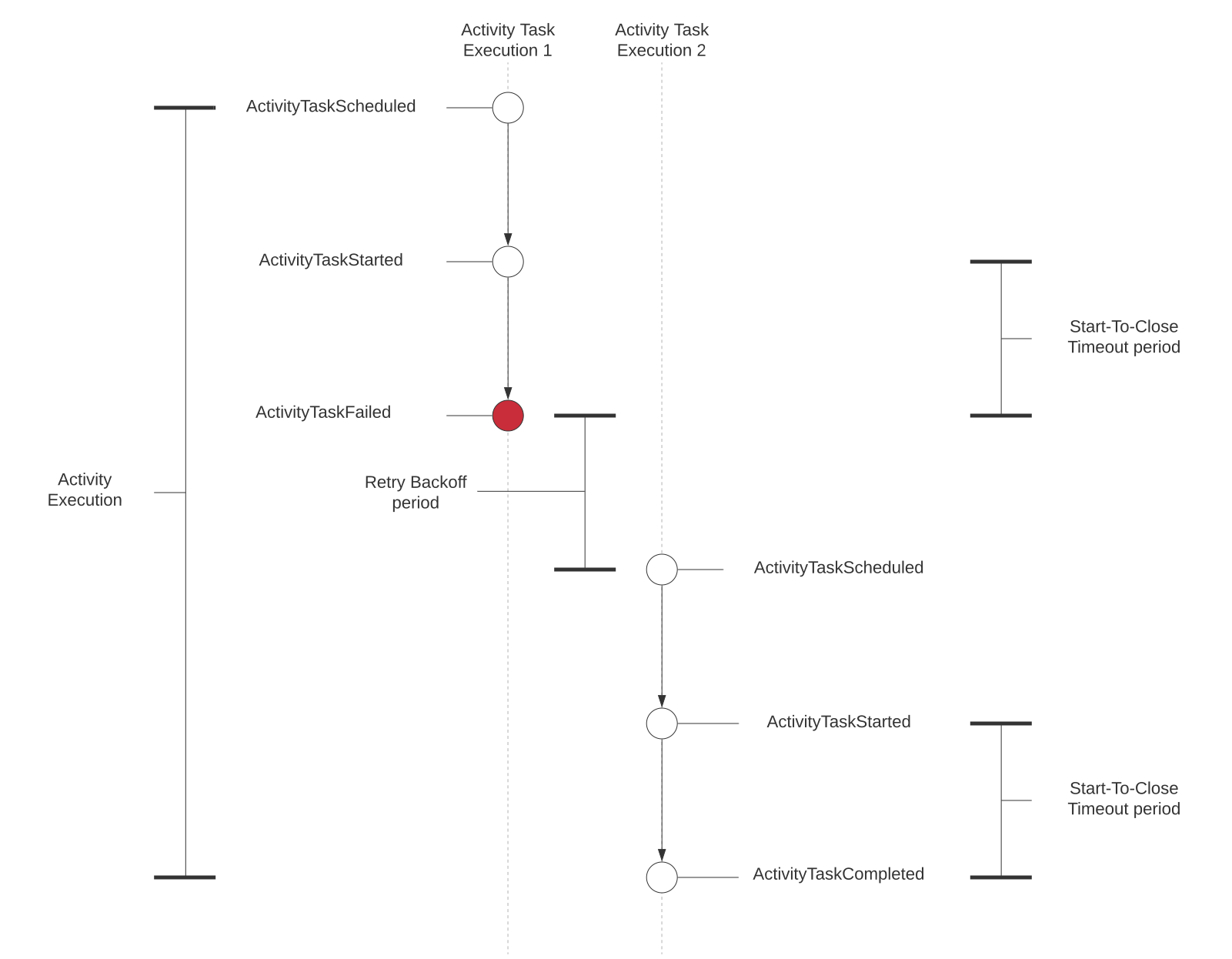
Start-To-Close Timeout period with retries
If this timeout is reached, the following actions occur:
- For a Workflow Activity, an ActivityTaskTimedOut Event is written to the Workflow Execution's mutable state. A Standalone Activity has no Workflow Execution, so this isn't recorded the same way — see Activity Execution for what Standalone Activities provide instead.
- If a Retry Policy dictates a retry, the Temporal Service schedules another Activity Task.
- For a Workflow Activity, the attempt count increments by 1 in the Workflow Execution's mutable state.
- The Start-To-Close Timeout timer is reset.
Schedule-To-Close Timeout
What is a Schedule-To-Close Timeout in Temporal?
A Schedule-To-Close Timeout is the maximum amount of time allowed for the overall Activity Execution, from when the first Activity Task is scheduled to when the last Activity Task, in the chain of Activity Tasks that make up the Activity Execution, reaches a Closed status.
- Set a Schedule-To-Close Timeout using the .NET SDKfeature-guide
- Set a Schedule-To-Close Timeout using the Go SDKfeature-guide
- Set a Schedule-To-Close Timeout using the Java SDKfeature-guide
- Set a Schedule-To-Close Timeout using the PHP SDKfeature-guide
- Set a Schedule-To-Close Timeout using the Python SDKfeature-guide
- Set a Schedule-To-Close Timeout using the Ruby SDKfeature-guide
- Set a Schedule-To-Close Timeout using the Rust SDKfeature-guide
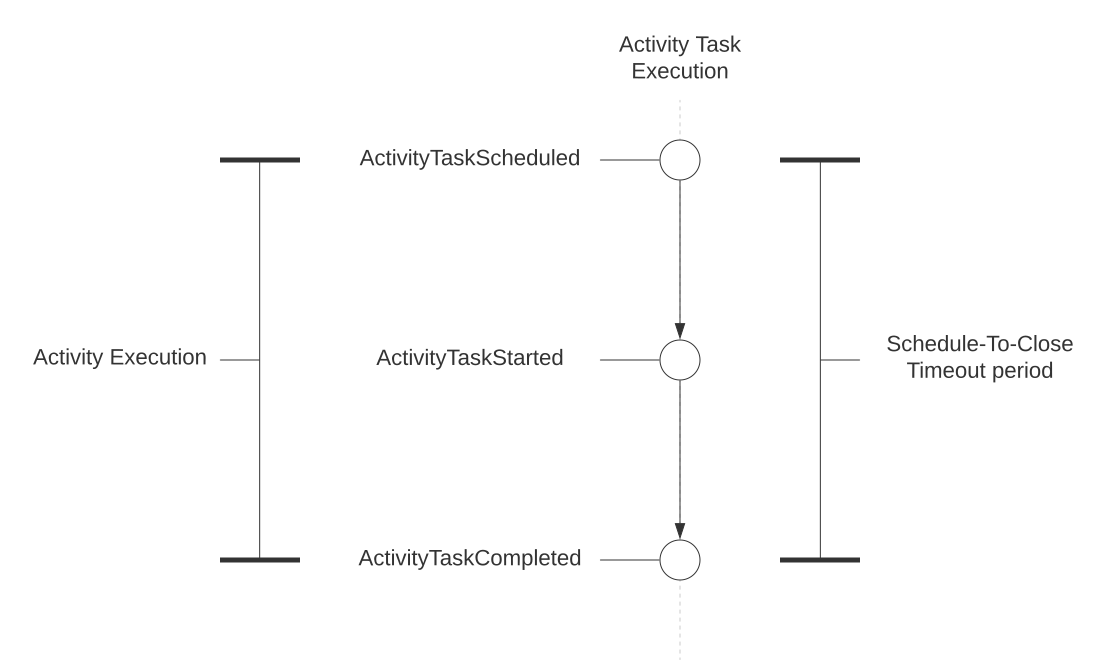
Schedule-To-Close Timeout period
Example Schedule-To-Close Timeout period for an Activity Execution that has a chain Activity Task Executions:
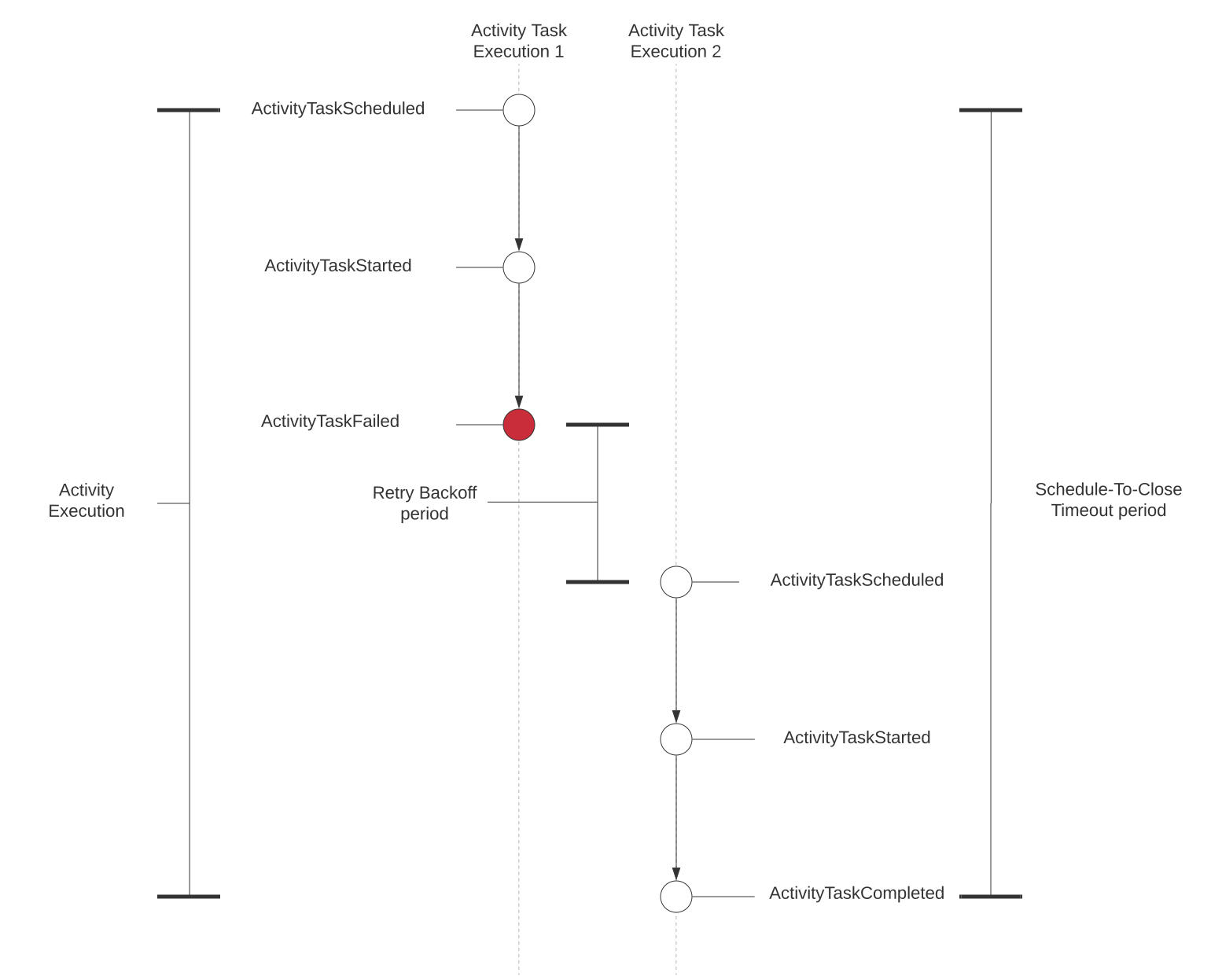
Schedule-To-Close Timeout period with a retry
The default Schedule-To-Close Timeout is ∞ (infinity).
An Activity Execution must have either this timeout (Schedule-To-Close) or Start-To-Close set. This timeout can be used to control the overall duration of an Activity Execution in the face of failures (repeated Activity Task Executions), without altering the Maximum Attempts field of the Retry Policy.
We strongly recommend setting a Start-To-Close Timeout.
The Temporal Server doesn't detect failures when a Worker loses communication with the Server or crashes. Therefore, the Temporal Server relies on the Start-To-Close Timeout to force Activity retries.
Activity Heartbeat
What is an Activity Heartbeat in Temporal?
An Activity Heartbeat is a ping from the Worker that is executing the Activity to the Temporal Service. Each ping informs the Temporal Service that the Activity Execution is making progress and the Worker has not crashed.
- Heartbeat an Activity using the .NET SDKfeature-guide
- Heartbeat an Activity using the Go SDKfeature-guide
- Heartbeat an Activity using the Java SDKfeature-guide
- Heartbeat an Activity using the PHP SDKfeature-guide
- Heartbeat an Activity using the Python SDKfeature-guide
- Heartbeat an Activity using the Ruby SDKfeature-guide
- Heartbeat an Activity using the Rust SDKfeature-guide
 Heartbeat an Activity using the TypeScript SDKfeature-guide
Activity Heartbeats work in conjunction with a Heartbeat Timeout.
Activity Heartbeats are implemented within the Activity Definition. A Heartbeat can include details that record progress for the next attempt.
An Activity Heartbeat can be recorded as often as needed (for example, once a minute or every loop iteration). It is often a good practice to Heartbeat on anything but the shortest Activity Execution. Temporal SDKs control the rate at which Heartbeats are sent to the Temporal Service.
Heartbeating is not required from Local Activities, and does nothing.
For long-running Activities, set a Heartbeat Timeout shorter than the Start-To-Close Timeout, and Heartbeat at least once per throttle interval. If the Worker fails, the Temporal Service then times out the attempt after one Heartbeat Timeout instead of waiting for the Start-To-Close Timeout. See Choose a Heartbeat Timeout.
Activity Cancellations are delivered to Activities from the Temporal Service when they Heartbeat. Activities that don't Heartbeat can't receive a Cancellation. Heartbeat throttling may lead to Cancellation getting delivered later than expected.
Throttling
Heartbeats may not always be sent to the Temporal Service—they may be throttled by the Worker. The throttle interval is the smaller of the following:
- If
heartbeatTimeoutis provided,heartbeatTimeout * 0.8; otherwise,defaultHeartbeatThrottleInterval maxHeartbeatThrottleInterval
defaultHeartbeatThrottleInterval is 30 seconds by default, and maxHeartbeatThrottleInterval is 60 seconds by default.
Each can be set in Worker options.
Throttling is implemented as follows:
- After sending a Heartbeat, the Worker sets a timer for the throttle interval.
- The Worker stops sending Heartbeats, but continues receiving Heartbeats from the Activity and remembers the most recent one.
- When the timer fires, the Worker:
- Sends the most recent Heartbeat.
- Sets the timer again.
Throttling allows the Worker to reduce network traffic and load on the Temporal Service by suppressing Heartbeats that aren’t necessary to prevent a Heartbeat Timeout. Throttling does not apply to the final Heartbeat message in the case of Activity Failure. If an Activity fails just after recording progress information in a Heartbeat message, that progress information will be available during the next retry attempt, provided that the Worker itself did not crash before delivering it to the Temporal Service.
Because the Worker sends at most one Heartbeat per throttle interval, calling Heartbeat more often than that doesn't send more Heartbeats to the Temporal Service. As long as Activity code calls Heartbeat at least once per throttle interval, the Heartbeat Timeout sets the rate. With the default Worker options, any Heartbeat Timeout above 75 seconds gets the 60-second maximum throttle interval, so each Activity sends at most one Heartbeat a minute. On Temporal Cloud, each Heartbeat that reaches the Temporal Service is an Action.
A larger maxHeartbeatThrottleInterval means fewer Heartbeats, but Cancellations, Pauses, and Resets reach the Activity later, because they arrive only in Heartbeat responses.
A Worker crash also loses more unsent details.
Heartbeat details
A Heartbeat can carry details, a Payload that records the Activity's progress. When an attempt fails or times out, the next attempt receives the details from the last Heartbeat the Temporal Service recorded, and can continue from there. To checkpoint progress this way, see the Long-Running Activity pattern.
- The Temporal Service keeps only the latest details. Each recorded Heartbeat replaces the details from the one before.
- Details that the Worker hasn't sent yet are lost if the Worker crashes. The next attempt receives the last details that reached the Temporal Service, so it can repeat some work. Make the work idempotent.
- Details count against the payload size limit, 2 MB by default. Every recorded Heartbeat writes its details again in full. Store a small value, such as the index of the last item processed. Keep larger data in your own storage and put only a reference in the details.
- Resetting an Activity keeps its details.
To clear them, Reset with
--clear-heartbeat-details.
Which Activities should Heartbeat?
Heartbeating is best thought about not in terms of time, but in terms of "How do you know you are making progress?" For short-term operations, progress updates are not a requirement. However, checking the progress and status of Activity Executions that run over long periods is almost always useful.
Consider the following when setting Activity Heartbeats:
-
Your underlying task must be able to report definite progress. Note that the caller cannot read this progress information while the Activity is still executing (or it would have to store it in Event History). You can report progress to external sources if you need it exposed to the user.
-
Your Activity Execution is long-running, and you need to verify whether the Worker that is processing your Activity is still alive and has not run out of memory or silently crashed.
For example, the following scenarios are suitable for Heartbeating:
- Reading a large file from Amazon S3.
- Running a ML training job on some local GPUs.
And the following scenarios are not suitable for Heartbeating:
- Making a quick API call.
- Reading a small file from disk.
Heartbeat Timeout
What is a Heartbeat Timeout in Temporal?
A Heartbeat Timeout is the maximum time between Activity Heartbeats.
- Set a Heartbeat Timeout using the .NET SDKfeature-guide
- Set a Heartbeat Timeout using the Go SDKfeature-guide
- Set a Heartbeat Timeout using the Java SDKfeature-guide
- Set a Heartbeat Timeout using the PHP SDKfeature-guide
- Set a Heartbeat Timeout using the Python SDKfeature-guide
- Set a Heartbeat Timeout using the Ruby SDKfeature-guide
- Set a Heartbeat Timeout using the Rust SDKfeature-guide
- Set a Heartbeat Timeout using the TypeScript SDKfeature-guide
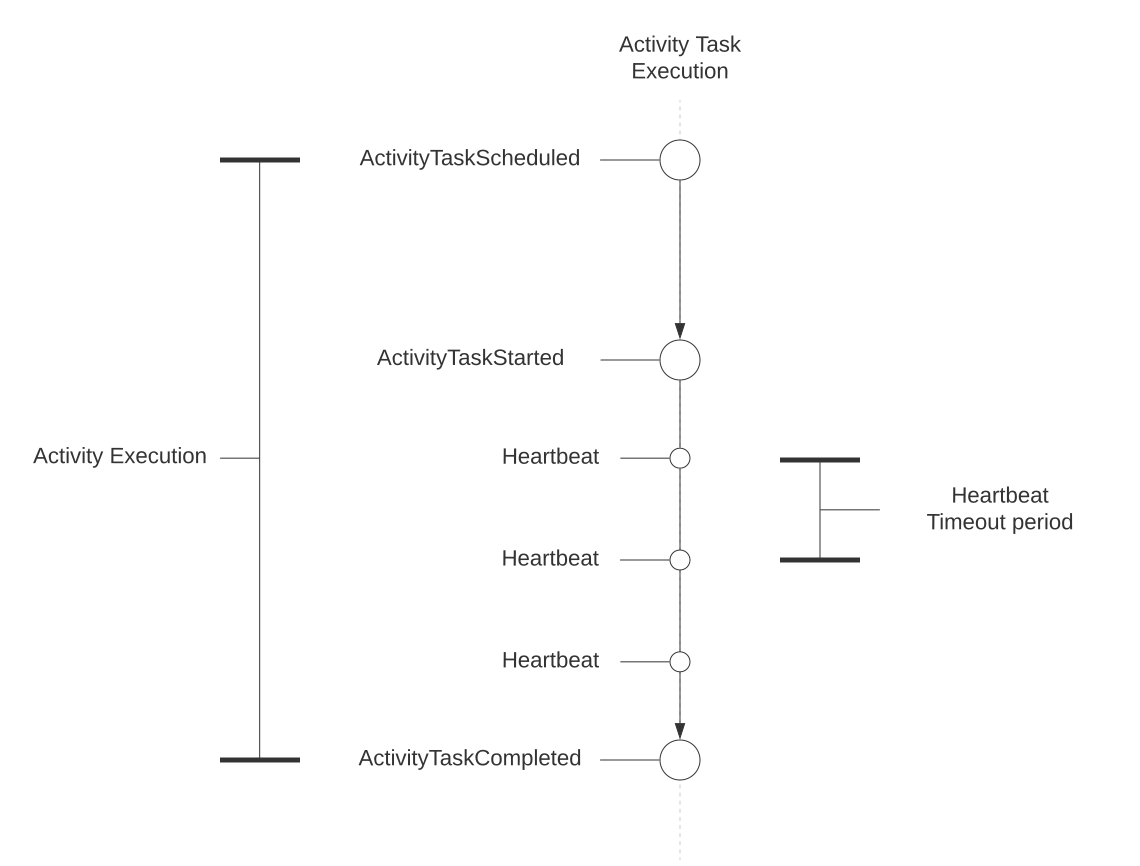
Heartbeat Timeout periods
If this timeout is reached, the Activity Task fails and a retry occurs if a Retry Policy dictates it.
Set both a Heartbeat Timeout and Heartbeat calls. Without Heartbeat calls, the Heartbeat Timeout times out every attempt one Heartbeat Timeout after it starts. Without a Heartbeat Timeout, Heartbeat calls still deliver Cancellations, but the Temporal Service detects a failed Worker only at the Start-To-Close Timeout.
The first Heartbeat Timeout of an attempt counts from when the Temporal Service records the attempt as started. That happens before the Worker receives the Activity Task, so delivering the task and starting the Activity code count against it. After that, the Temporal Service times out the attempt when one Heartbeat Timeout passes after the last Heartbeat it recorded.
Choose a Heartbeat Timeout
A shorter Heartbeat Timeout detects a failed Worker sooner but gives each Heartbeat less time to arrive.
If the Worker crashes, the attempt times out one Heartbeat Timeout after the last Heartbeat the Temporal Service recorded. If the Activity code hangs while the Worker keeps running, the Worker still sends the code's last Heartbeat when the throttle interval ends, so the attempt times out between one and about 1.8 Heartbeat Timeouts after the code's last Heartbeat call.
The Worker sends a Heartbeat when each throttle interval ends, at 80% of the Heartbeat Timeout. That Heartbeat has the remaining 20% of the timeout to reach the Temporal Service and be recorded: 2 seconds for a 10-second Heartbeat Timeout. Above 75 seconds, the throttle interval stays at 60 seconds, so a Heartbeat has the Heartbeat Timeout minus 60 seconds.
A Heartbeat can arrive late even though the Worker is healthy and the Activity code Heartbeats on time. The attempt then times out while it's still working, usually for one of these reasons:
- The Worker is short of CPU for the number of Activities it runs at once, so it sends Heartbeats late. Lower the Worker's maximum number of concurrent Activity executions, or add Workers. See Worker performance.
- Many Activities Heartbeat at the same time in one Workflow Execution. Each Heartbeat updates the Workflow Execution, and the Temporal Service applies updates to one Workflow Execution one at a time, so the Heartbeats wait for each other. Run fewer of these Activities at once, or spread them over Child Workflows.
- The Temporal Service rejects Heartbeats with
RESOURCE_EXHAUSTEDbecause a rate limit was reached. See NOT_FOUND on Activity heartbeat for how to check.
If Heartbeats regularly arrive near the deadline, lengthen the Heartbeat Timeout.
Don't set a Heartbeat Timeout under one second. The Temporal Service checks a timeout that short only about once a second, so it doesn't detect a failed Worker any sooner, and the Activity sends many more Heartbeats.
What happens after a Heartbeat Timeout
When the Heartbeat Timeout is reached, the attempt fails with a Timeout Failure of type HEARTBEAT.
Set Maximum Attempts or a Schedule-To-Close Timeout on Activities that Heartbeat. The default Retry Policy has no attempt limit, so an Activity whose Heartbeats keep arriving late is retried until its Schedule-To-Close Timeout, or indefinitely if it has none.
- The timed-out attempt can keep running. The Temporal Service doesn't stop it, so it can run at the same time as the next attempt. Make the Activity idempotent, and end it when the SDK reports the timeout.
- Retries don't appear in Event History.
While the Activity is retried, the Web UI's Pending Activities view and
temporal workflow describeshow its attempt number, its last failure (activity Heartbeat timeout), and its last Heartbeat time and details. Event History records only the final attempt, when the Activity closes. See Failures in Event History. If the Workflow Execution is terminated while the Activity waits for its next attempt, the Event History keeps no record of the timeouts. - Pausing doesn't move the Heartbeat deadline. See Pause.
What a Heartbeat Timeout of 0s means
0s means the Heartbeat Timeout is disabled. No Heartbeat timer is started, so the Activity never fails for missing a Heartbeat. It does not mean an unbounded timeout, and it does not mean the Activity times out immediately.
0s is also the normalized value the Temporal Service stores when you leave the Heartbeat Timeout unset. An unset Heartbeat Timeout and an explicit 0s are therefore indistinguishable once the Activity is scheduled: both are reported as 0s and both behave as disabled.
The Heartbeat Timeout is also capped at the Start-To-Close Timeout. Setting a Heartbeat Timeout longer than the Start-To-Close Timeout stores the Start-To-Close Timeout instead.